
-
🔰 fundamental topics for beginners getting started with DevSensei
-
🔬 advanced topics for once you have your first workflows automated
Each workflow automates specific tasks for the pull requests of your team.
A workflow includes:
-
a unique
nameto identify the workflow -
a set of
conditionsto be met. Once these conditions are met the actions are executed -
optionally: a set of
actionsto be executed when the conditions are met for a pull request -
optionally: a set of
merge-checks(active when workflow conditions are met) that will prevent merging unless they succeed. -
optionally: configuration of
custom-attributesto be used by the workflow
How does it work? 🔰
Initial Setup🔰
Configure the workflows for your team
-
on the default branch
-
in the
devsensei.yamlfile -
at the top-level directory of your repository.
The devsensei.yaml file consists of a set of workflows.
Conditions 🔰
Use conditions to decide for which pull requests to run your actions, or enforce extra merge checks. Conditions give you full control to tailor a workflow to run the actions exactly when you need.
A basic condition is a comparison on a pull request attributes like title, source and destination branch. Then compare the attributes with an operators like equality =, glob matching ~=, negations not to the desired value.
conditions:
  - draft                       # check that pull request is a draft
  - not(draft)                  # negate a comparison: Check that the pull request is not a draft
  - source = 'main'             # Check that the source branch is the main branch
  - destination ~= 'releases/*' # Check that the destination is matching the glob releases/*
All conditions in the conditions list must be fulfilled to run an action. Use or and and blocks if you need logical combinations of conditions.
conditions:
    - or:
        - draft
        - title ~= 'DRAFT*'
    - and:
        - source = 'develop'
        - destination ~= 'releases/*'
Define complex conditions using expressions.
Actions 🔰
Actions do things for you, like adding comments and/or reviewers, merging the PR, etc.
A workflow has one or more actions.
When Do Actions Run 🔰🔬
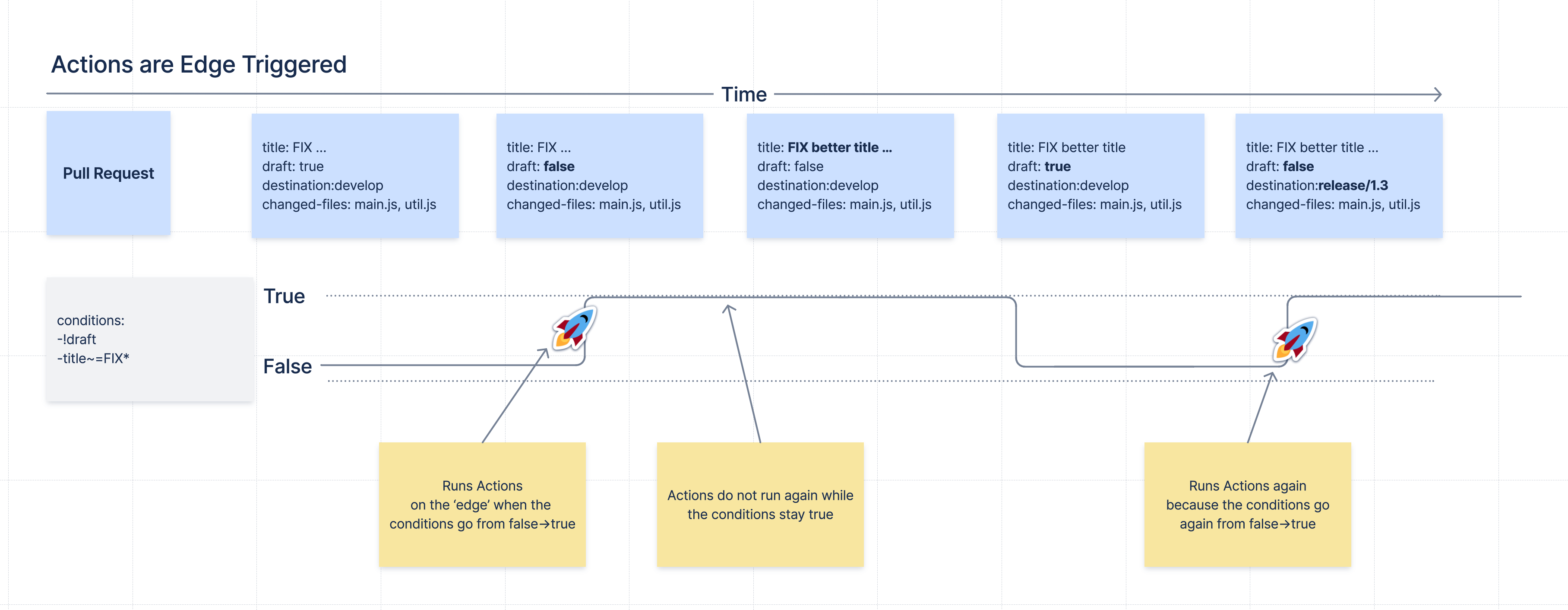
Actions run when the conditions change from false to true.
Then, actions do not run again as long as the condition stays true.
When conditions go again back to false and then true, the actions run again.
This concept is called Edge Triggering, as actions are triggered on the 'edge' of the signal when the conditions do change.
Run Actions More Often 🔬
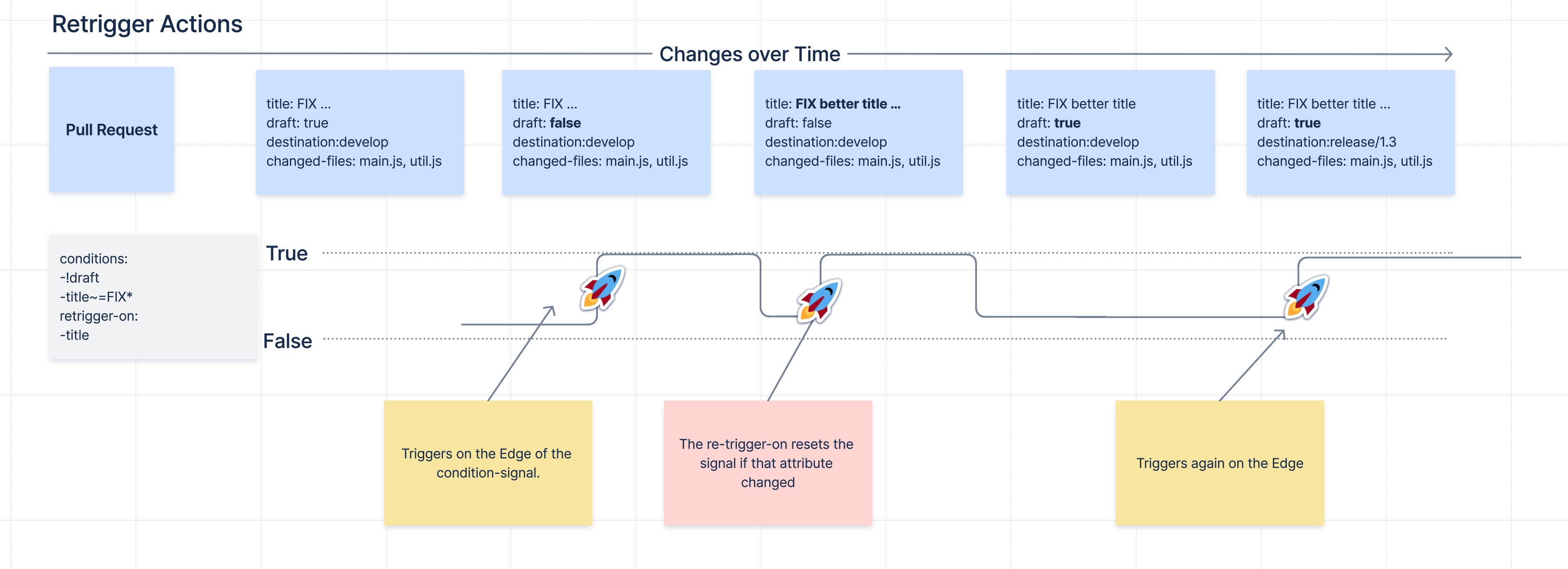
Sometimes you need to run the actions of a workflow more often, for example every time new commits are made to the pull request.
For that, there is the retrigger-on section. If the value of one of the attributes in the retrigger-on section changes, it will "reset" the condition signal and if the conditions are currently met, a new edge trigger happens, and the workflow’s actions will run again.
Examples:
workflows:
  - name: Reminder that changes for releases need extra care
    conditions:
    - destination ~= 'release/*'
    retrigger-on:
    - source-head-sha # Retrigger if commits change
    actions:
    - add-comment:
        content: |
            Be careful. PRs to ${destination} should only be for bugfix releases.
  - name: Send a reminder to the customer of a planned fix
    conditions:
    - destination ~= 'customer/*'
    - source ~= 'bugfix'
    retrigger-on:
    - destination # Retrigger if the destination changes
    actions:
    - add-comment:
        content: |
          Inform the customer about the planned customer specific bugfix
  - name: Add CodeOwner reviewers, and update if the are new commits
    conditions:
    - destination ~= 'customer/*'
    - source ~= 'bugfix'
    retrigger-on:
    - diff-change # Retrigger if contents of diff change
    custom-attributes:
      codeowners:
        rules: |
          **/*.java    java-expert@our-company.com
          **/*.js      javascript-expert@our-company.com
    actions:
      - add-reviewers:
          members: codeowners
Merge checks 🔰
Merge checks let you define extra rules, enforced while workflows are active, to protect your team’s repository from merging invalid PRs. For example, only accepting PR’s that follow your specific branch naming conventions.
Compared to Bitbucket’s own builtin merge checks, DevSensei allows you to use the same expressions and attributes as workflow conditions to customize exactly when checks should prevent a merge.
Example
Bitbucket has a builtin merge check to enforce a minimum number of approvals. However, the only configuration is a number. With DevSensei you can scope this further by, for example, restricting the check to specific branch patterns:
workflows:
  - name: stricter main checks
    conditions:
      - destination = 'main'
    merge-checks:
      - title: 2 approvals for main
        check:
          - count(approved-by) >= 2
How do configuration changes affect existing pull requests? 🔬
DevSensei reads the configuration always from the default branch. That means that all open pull requests will use the same configuration and changes in the configuration affect all pull requests.
When you change the configuration, then when DevSensei runs the next time, the new configuration is applied.
Table 1. The next time DevSensei runs:
|
Configuration change |
Effect on Existing Pull Request |
|---|---|
|
New Workflow is Added |
The workflow’s actions are applied if the conditions are met |
|
Workflow is Renamed |
Workflows are identified by name, therefore this acts as if a new workflow is introduced. See above |
|
|
The next time actions are running, the new configuration for the action is used |
|
|
Then new conditions are checked the next time DevSensei runs |
|
|
The condition signal is reset when the |