
A Day in the Life of a Knowledge Manager (Metadata + Workflows)
Picture this.
A large organisation, maybe a bank, a hospital, a tech company, where the knowledge base is the beating heart of how work gets done. Policies, procedures, best practices - all living inside Confluence.
But here’s the hard truth:
Most teams set it and forget it.
Pages get written. Pages get published. Pages get… dusty.
Until one day, someone relies on an old procedure, and the consequences are real….
It’s 8:30 AM.
Sarah is on her second sip of coffee, glancing at Microsoft Teams as the notifications pile up.
A message from product:
“Hey, is the versioning on the security policy correct? I feel like the last two updates are identical.”
she sighs, snaps a screenshot of the Metadata dashboard, and sends it back:
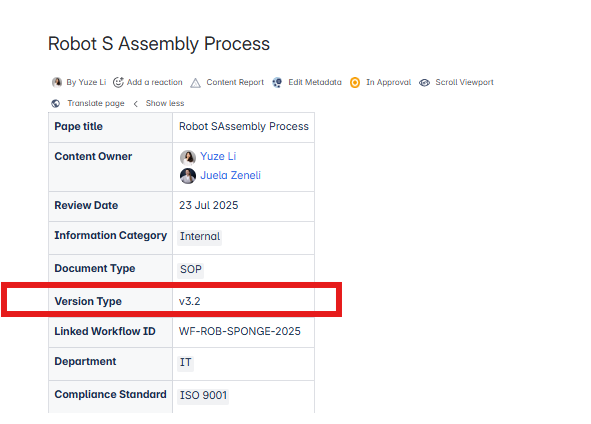
“The version’s right there in the Metadata panel 😉.”
By the time she gets to the office, her manager swings by:
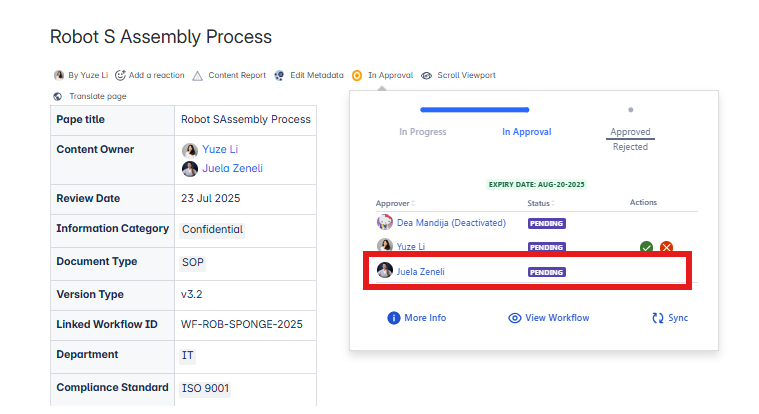
“Hey, Lara, the Content Owner of an important SOP page, moves to another team and hands over ownership to Juela. Will the approvers know they are now responsible? Will they even realize this document changed?”
She smiles (nervously), but inside she is relieved.
Thank goodness she sets up Metadata for Confluence with Owner as required fields.
In a traditional Confluence setup, she’d worry, because changing the page metadata wouldn’t trigger any workflow, and the page would remain marked as “Approved” even though the owner just changed. But with the integration of Metadata for Confluence and Workflows for Confluence, it’s different now:
“This update automatically pushes to Workflows for Confluence. The page status changes back to “In approval”, because ownership is a key compliance detail. The assigned approvers get notified automatically that the document needs re-review.”
10:00 AM.
The product lead pops into her Teams chat:
“Do you think we can add formal approvals to the security docs? The ISO auditors want to see an approval trail.”
Good thing she just integrated Workflows for Confluence.
She opens the configuration, knowing that:
✅ The Owner fields are already set up in Metadata
✅ Workflows can pull those fields directly into the approval process
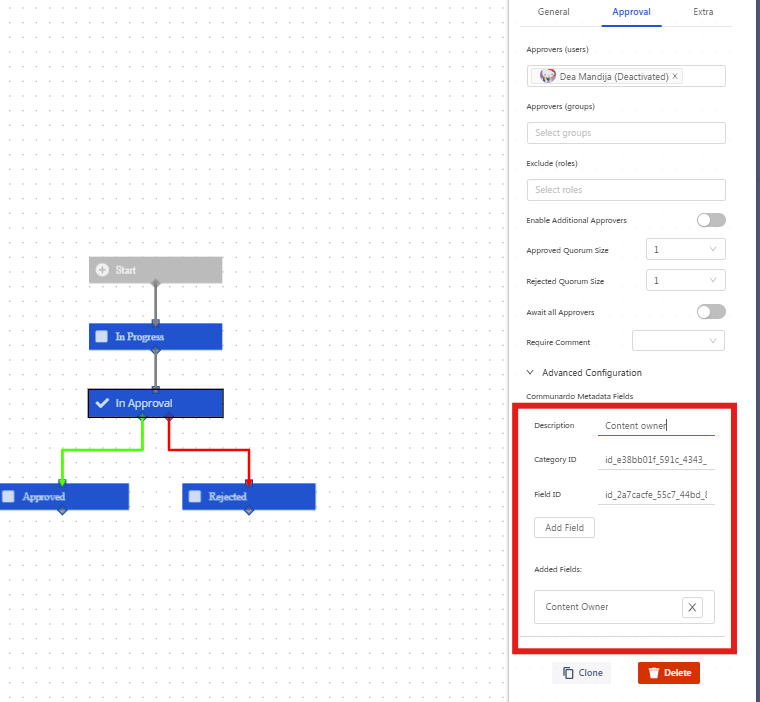
Minutes later, the approval flow is live.
she exhales. Not bad.
Lunchtime.
She is out grabbing a sandwich when she sees a Teams ping on her phone:
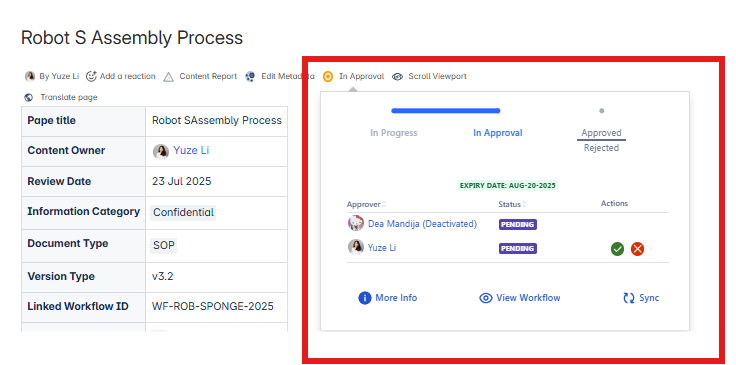
“Hey, the info security team is asking: when a document’s category changes to ‘Confidential,’ do owners get notified?”
She types back:
“Cloud version can’t auto-notify yet, but you can catch it in the Metadata report.”
Then you make a mental note: We really should flag that as a feature request.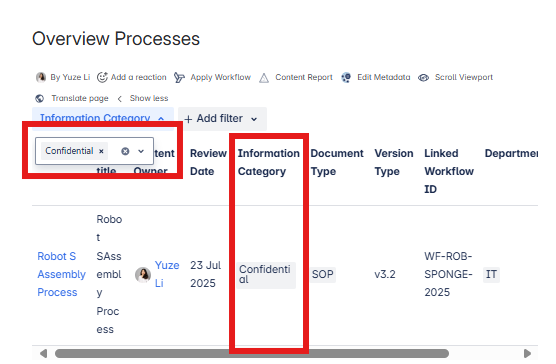
3:00 PM.
Weekly review meeting.
Her manager glances at the dashboard and raises an eyebrow:
“I see our knowledge base review rate jumped from 45% to 68% this month. How did you pull that off?”
She grins:
“Metadata tells us who owns what. Workflows makes sure it moves through approvals.
We finally ditched the manual follow-up game.”
Late evening.
She closes her laptop, stretch, and glance at the city lights outside.
A small thought crosses her mind:
“Hey — at least this part of the chaos is finally under control.”
She smiles, knowing that while knowledge management isn’t always glamorous, “today you made it just a little easier for everyone.”
What’s the real win?
✅ Metadata structures the knowledge
✅ Workflows drives the process
✅ Together, they turn your Confluence from a wiki graveyard into an active, audit-ready knowledge hub
Possible use cases>>>>
💡 1️⃣ Content Lifecycle Management
Challenge:
Knowledge bases (KBs) often fill up with outdated, duplicate, or irrelevant articles over time.
Solution:
✅ Use Metadata to tag each KB article with:
-
Content Owner
-
Review Interval (e.g., every 12 months)
-
Audience (e.g., Internal, Partners, Customers)
-
Content Type (FAQ, How-to, Policy)
✅ Use Workflows to manage:
-
Draft → Review → Approved → Published statuses
-
Periodic review cycles (e.g., quarterly sweep) with assigned reviewers
-
Automatic reminders for owners when review dates approach (currently on DC, but on Cloud you can still report on overdue items)
Impact:
Keeps the knowledge base fresh, relevant, and user-focused.
💡 2️⃣ Incident & Problem Documentation
Challenge:
Teams document incidents or problems but lack consistent post-mortem reviews or approvals.
Solution:
✅ Use Metadata to capture:
-
Incident Category (Bug, Outage, Security, etc.)
-
Severity Level
-
Impacted Products
-
Resolution Owner
✅ Use Workflows to ensure:
-
Post-incident reports go through required reviews
-
Approvals by tech leads, incident managers, or security teams
-
Final documentation is properly published and tagged for future reference
Impact:
Improves organizational learning and avoids repeated mistakes.
💡 3️⃣ Policy & Procedure Updates
Challenge:
Company policies (HR, Legal, Security) often go stale or circulate informally.
Solution:
✅ Use Metadata to tag:
-
Policy Type (HR, Legal, IT, etc.)
-
Owner (department head)
-
Last Updated Date
-
Next Review Date
✅ Use Workflows to enforce:
-
Draft → Legal Review → Executive Approval → Publish process
-
Notification and approval tracking
-
Document control and version history
Impact:
Ensures that critical policies are accurate, up to date, and legally compliant.
💡 4️⃣ Training Materials & Certifications
Challenge:
Training content gets created but isn’t always tracked or maintained.
Solution:
✅ Use Metadata to tag:
-
Course Owner
-
Target Audience
-
Certification Linked (yes/no)
-
Last Review Date
✅ Use Workflows to manage:
-
Review cycles for course updates
-
Approval flows before publishing learning materials
-
Tracking when major certifications or compliance courses change
Impact:
Keeps learning resources current and aligned with certifications or compliance needs.