
Problem statement
-
Symptom: Skills profiles in Meridian People & Skills Hub stay empty across the instance, or one person's profile shows no skills although they work in Jira and Confluence every day.
-
Where it happens: In the hub, in My skills profile and Find experts, and in the Get expert advice panel on a Jira issue.
-
Who can fix it: A Jira global admin. The first two checks need admin rights.
Quick resolution
Most empty instances come from the first two checks.
-
Confirm that a profile population mode is saved. In Jira, go to Settings, then Apps, then People & Skills Hub. If the page still asks you to choose a mode, the app has collected nothing and no scan has run. See Choose a profile population mode.
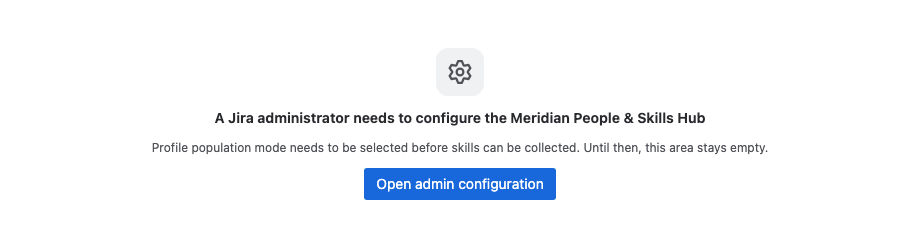
Image 1: While no mode is saved, the app shows this notice instead of content (click to enlarge) -
Give the first scan time. After you save the mode, the app scans Jira issues resolved in the last 30 days, and Confluence pages edited in the last 30 days if Confluence is on the same site and connected to the app. Both run in hourly portions, so a large instance works through its content over several runs.
-
Confirm that the content is in scope. The app reads:
-
Jira issues that are resolved and done, outside Jira Service Management projects
-
Confluence pages and live docs, ignoring edits marked as minor
In Jira, the app credits the people who acted on the issue, based on the issue history and their own comments. In Confluence, the page's author, everyone who edited it, and the page owner. Work in open issues, in Jira Service Management, or in Confluence comments produces nothing for anybody.
-
-
Check the Suggested tab of an affected profile. In Strict Compliance mode, derived skills wait there until the person accepts them, so a profile can look empty while suggestions are queued.
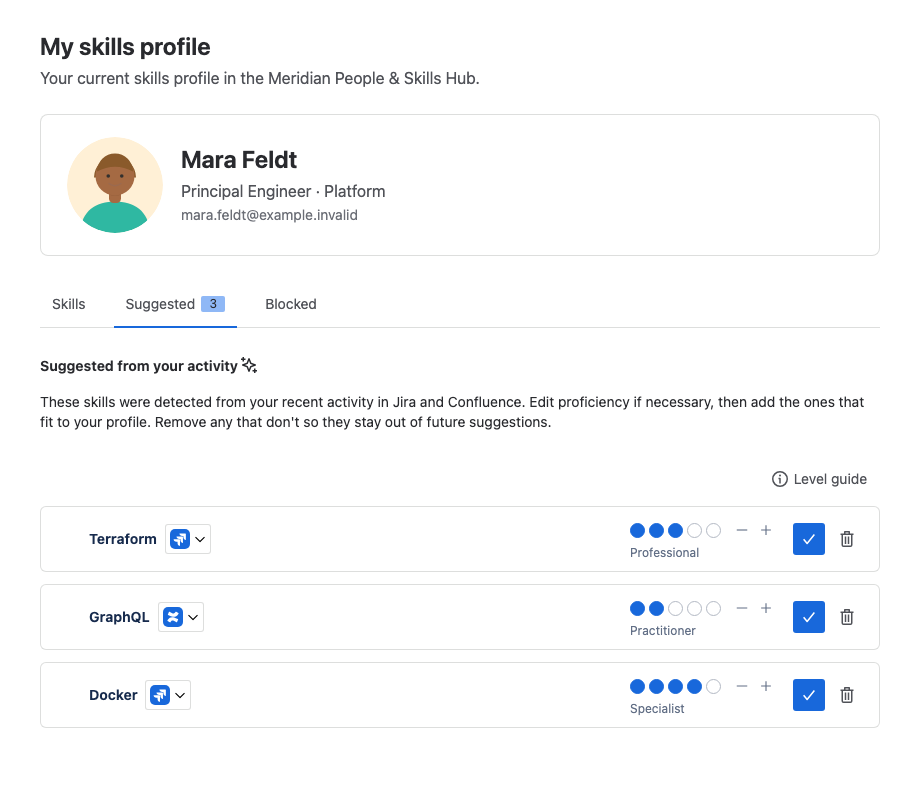
Image 2: In Strict Compliance, derived skills wait in the Suggested tab (click to enlarge)
Do not use the Skills Navigator agent to test whether the app is configured. The not-configured notice appears in the hub and in the Get expert advice panel, but the agent doesn't show it.
If this did not help
Everybody is affected. The mode and the first scan are covered above. What remains:
-
Check the app's license. In Jira, go to Settings, then Apps, then Manage apps, and open the People & Skills Hub entry. Without a valid license, the app stops starting new scans and shows a license notice instead of its content, so existing profiles stay as they are and no new skills arrive. Nothing is deleted. As soon as the license is valid again, the collected skills are available immediately, and scanning continues on its normal schedule. The scans that fell into the period without a license are not repeated, so that gap closes only as people keep working and new activity is picked up.
-
If only Confluence skills are missing, check whether Confluence is connected to the app. Without that connection, no page ever produces a skill, and Jira keeps working normally.
One person is affected.
-
Check whether that account takes part at all: an account the app does not serve has no profile and contributes no content. See Who takes part in the hub.
-
Ask whether they accepted Atlassian's Access required dialog. Someone who declines it ends up with an app that doesn't work for them. See The app does not work after you declined the access dialog.
-
Look at what that person actually works on, against the sources in check 3. Somebody who works only in Jira Service Management, only in open issues, or only in Confluence comments produces no skills, no matter how busy they are.
-
Check the age of their work. The initial scan reaches back 30 days and never repeats. Work older than that window produces no skills, and only new activity does from now on.
When to contact support
Contact Elevatic support when:
-
A mode is saved, other profiles are filling up, and one person's profile stays empty although their work matches the sources in check 3.
-
A mode is saved, the initial scan window has clearly passed, and no profile in the instance holds a single skill.