This guide is for everyone who works with Meridian People & Skills Hub in Jira or Confluence. You do not need admin rights.
Prerequisites
-
A Jira admin has chosen the profile population mode. Until then, the app collects no skills, and the hub tells you so instead of showing content.
-
You granted the app access when Atlassian asked. If you declined that dialog, see The app does not work after you declined the access dialog.
-
Your account is one the app serves; see Who takes part in the hub.
Where your skills come from
You do not fill in your skills profile yourself. The app reads the work you have finished, such as resolved Jira issues and Confluence pages, and proposes the skills behind it. An open issue produces nothing, because a skill should reflect work you completed.
The app proposes a starting point. You decide which skills stay on your profile, at which level, and which ones the app should never suggest again.
Key terms
|
Term |
What it means |
|---|---|
|
Skills profile |
Your collection of skills in the hub. You maintain your own, and other people's profiles are read-only for you. |
|
Skill |
A single capability that can be searched, for example |
|
Skill catalog |
All skill names your organization has collected so far. It grows on its own; nobody curates it. |
|
Skill suggestion |
A skill the app derived and offered to you. It is not on your profile until you accept it. |
|
Proficiency |
Your level in a skill, from 1 to 5: Learner, Practitioner, Professional, Specialist, Expert. |
|
Evidence |
The Jira issues and Confluence pages the app reads to derive a skill. |
|
Match score |
A percentage that ranks how well a person fits the skills someone searched for. It is not the same as proficiency. |
|
Blocked skill |
A skill you rejected. The app won't suggest or add it again until you unblock it. |
Where to find the app
|
Where |
How to open it |
|---|---|
|
The hub |
In Jira or Confluence, open Apps in the navigation and select People & Skills Hub under Your apps. |
|
A Jira issue |
Open an issue and look for the Get expert advice panel in the context section on the right. |
|
A Confluence page |
Open a page or blog post and click Get expert advice in the byline below the page title. |
|
Rovo chat |
Ask the Skills Navigator agent. |
What you can do
Maintain your profile:
-
Review your suggested skills and decide which ones fit.
-
Adjust a skill level on the scale from 1 to 5.
-
Remove a skill when a topic doesn't fit your profile. Removing it also stops the app from suggesting it again.
-
Check the evidence behind a skill to see which work it came from.
Find people:
-
Find an expert for a topic by describing it in your own words.
-
Get expert advice on a Jira issue without leaving the issue.
-
Get expert advice on a Confluence page without leaving the page.
-
Ask the Skills Navigator agent for experts in Rovo chat.
-
Analyze skills coverage to find expertise gaps in a team, a department, or a planned piece of work.
Two modes, two experiences
Your profile looks different depending on the mode your admin chose. You cannot change this yourself.
-
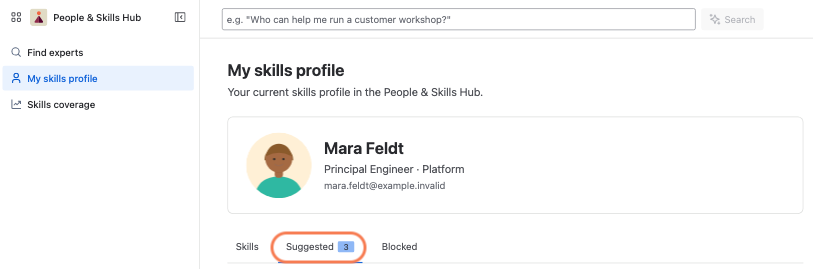
Strict Compliance: Derived skills arrive as suggestions. Your profile has a Suggested tab, and nothing appears until you accept it.
-
Maximum Velocity: Derived skills appear directly on your profile. There is no Suggested tab. You can still change a level, and you can remove a skill, which also blocks it from coming back.
If you are unsure which mode is active, look for the Suggested tab in your profile.