
A skill the app derived from your work doesn't always describe you. When you take a skill off your profile, Meridian People & Skills Hub blocks it at the same time: The skill moves to your Blocked list, and the app doesn't derive it again until you unblock it. Removing and blocking are one action, there is no way to remove a skill and leave it open for the future.
Remove a skill from your profile
Removing a skill also deletes its evidence history. If you unblock the skill later, the old evidence won't return.
-
Open the hub and select My skills profile.
-
Select the Skills tab.
-
Remove one skill or several:
-
For one skill, click the remove button on its row.
-
For several, select the checkbox on each skill, then click Remove in the bar that appears. The bar shows how many skills you selected.
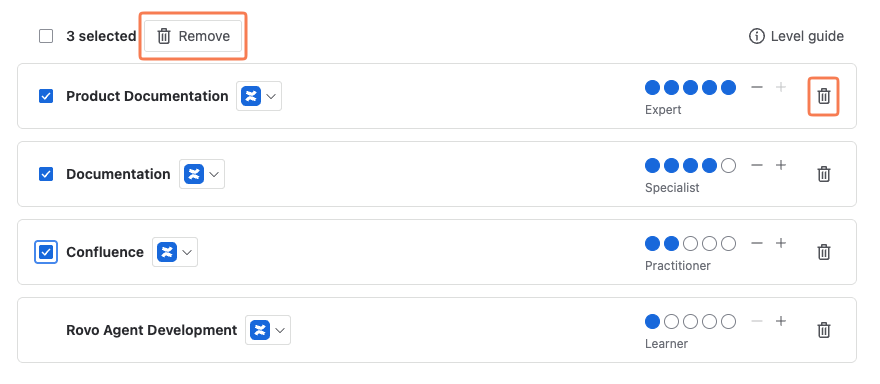
Image 1: Remove skills (click to enlarge)
-
-
In the confirmation dialog, check what happens to the skill.
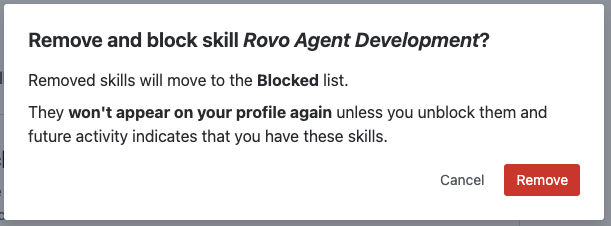
Image 2: Confirmation dialog (click to enlarge) -
Click Remove.
The skill disappears from your profile and appears on the Blocked tab. The app won't suggest or add it again, no matter what your future work looks like. Expert search and skills coverage no longer count you for that skill.
Unblock a skill
-
Open the hub and select My skills profile.
-
Select the Blocked tab. Blocked skills are sorted by name.
-
Click the unblock button next to the skill.
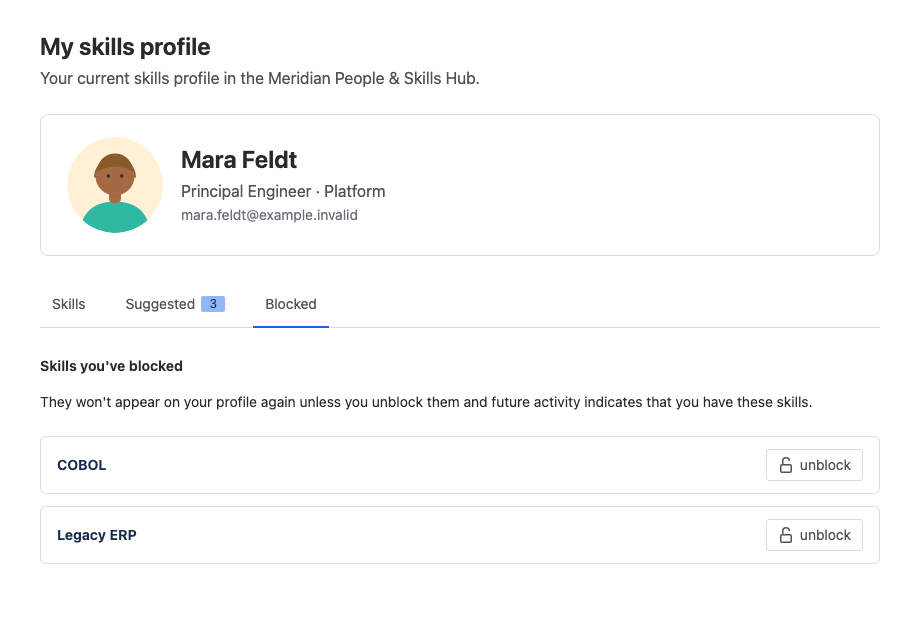
Image 3: Unblock a skill (click to enlarge)
The skill leaves the Blocked tab, but it doesn't return to your profile right away. It becomes available again, so the next time your work points to that skill, the app suggests it or adds it, depending on the mode your organization uses.