
In Jira Service Management, you can add the Skills Navigator agent to a ticket. It reads the ticket, works out which skills the problem needs, and suggests colleagues who have them. Use it when you need to know whom to ask for help or whom to involve.
For how agents work on work items in general, see Atlassian's Collaborate on work items with AI agents.
Get expert suggestions for a ticket
-
Open the ticket.
-
Select Agents and choose Skills Navigator.
-
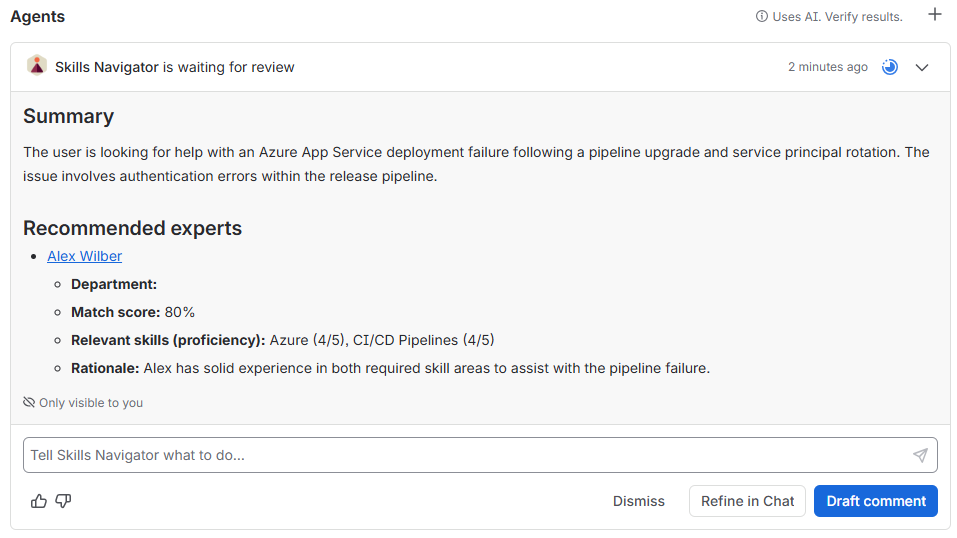
Wait for the answer in the Agents section of the ticket. It has a short summary of the problem and a ranked list of up to five people. For each person, it gives the name as a link to their skills profile, their role, the match score, the matched skills with their level, and a short rationale.
-
Decide what to do with the answer:
-
Draft comment copies the answer into a comment, links included. Save it as an internal note, so that the customer doesn't see the list of colleagues.
-
Refine in Chat opens Rovo chat with the agent, where you can ask follow-up questions, for example about a different skill.
-
Dismiss discards the answer.
-
Who sees the answer
-
Until you post it, the answer is only visible to you. Nothing on the ticket changes, and other people only see that an agent worked on it.
-
An internal note is visible to your team but not to the customer. If you reply to the customer instead, they see the names on the list.
-
The links open each person's skills profile in the hub.
What to know
-
Skills Navigator suggests people. It doesn't assign the ticket; you decide whom to involve.
-
It searches your whole organization, not only the agents of this service space. Someone on the list may not be able to take the ticket, but you can still ask them for help.
-
The answer is only as specific as the ticket. A short ticket such as "Laptop slow" matches only general skills, such as customer support. If that happens, use Refine in Chat and name the skills you need.
-
As in Rovo chat, the list doesn't exclude the assignee, the reporter, or you.
-
Service tickets don't add skills to anyone's profile. The app derives skills from other Jira work and from Confluence pages.